Determining the appropriate sample size is crucial for any study, ensuring that results are reliable and statistically significant. G*Power is a popular, free tool for calculating sample size in various types of research studies, including psychology, medical, and social sciences. In this article, we will cover the importance of sample size, the basics of statistical power, and a step-by-step guide on how to determine sample size using GPower. This guide is optimised for search engines, helping you find everything you need to get started with sample size calculations using G*Power.
Why is determining sample size important?
Choosing an appropriate sample size ensures that your study has enough statistical power to detect meaningful effects. If the sample size is too small, you risk Type II errors (failing to detect an effect that exists), while a sample that is too large can be resource-intensive and may lead to Type I errors (finding a statistically significant result by chance). Using G*Power, researchers can efficiently calculate sample size to maximise validity and reliability without oversampling.
What is G*Power?
G*Power is a free, downloadable software used to conduct power analysis and calculate the minimum sample size required for statistical tests, you can download here. It covers a variety of tests, including t-tests, ANOVA, correlation, regression, chi-square, and more. G*Power calculates sample size based on:
Statistical power: The probability of detecting an effect when it exists (commonly set at 0.80 or 80%).
Effect size: A measure of the strength of the relationship or difference being studied.
Significance level (alpha): The probability of rejecting the null hypothesis when it is true (commonly set at 0.05).
How to determine sample size (steps)
Follow these steps to determine your required sample size using G*Power. Make sure to clearly define your study’s objectives, hypotheses, and the type of statistical test you plan to use.
Step 1: download and install G*Power
To get started, download GPower from the official GPower website. It is available for Windows and MacOS, and the installation process is straightforward.
Step 2: choose the type of statistical test
Open G*Power and select the type of test you need for your study. The “Test Family” and “Statistical Test” menus on the main screen allow you to choose from different statistical tests. Select the appropriate test based on your research question:
- Means (t-tests): For comparing group means.
- ANOVA: For comparing means among three or more groups.
- Correlation: For examining the strength of relationships between variables.
- Regression: For assessing the impact of one or more predictors on a dependent variable.
Selecting the correct test type will ensure accurate sample size calculation.
Step 3: select the power analysis type
Under “Type of Power Analysis,” select A priori. This type of analysis calculates the required sample size based on the specified parameters (desired power, effect size, and significance level).
Step 4: enter parameters for sample size calculation
Now, enter the essential parameters that influence your sample size:
- Effect Size: This is a critical value representing the expected impact of your intervention or variable. G*Power offers guidelines for setting small, medium, and large effect sizes:
- Small: 0.20 (d) for t-tests, 0.10 for ANOVA
- Medium: 0.50 (d) for t-tests, 0.25 for ANOVA
- Large: 0.80 (d) for t-tests, 0.40 for ANOVA
If you have prior research or pilot studies, you can use those results to determine a more accurate effect size.
2. Significance Level (α): This is commonly set at 0.05, meaning there’s a 5% chance of rejecting the null hypothesis when it is true. If your field requires stricter or more lenient standards, adjust accordingly.
3. Power (1 – β): This parameter reflects the probability of correctly detecting an effect, typically set at 0.80 (or 80%) in most research. A higher power, such as 0.90, may require a larger sample size but increases confidence in your results.
Step 5: run G*Power
Once all parameters are set, click Calculate. G*Power will display the minimum sample size required to achieve the specified power level, given the input parameters. You’ll see a summary of your inputs and the recommended sample size at the bottom of the screen.
Step 6: interpret the results
G*Power provides a detailed output that includes:
Total Sample Size: The minimum number of participants needed for the study.
Critical t or F values: Threshold values used in hypothesis testing.
Actual Power: The achieved power based on the calculated sample size. This output tells you how many participants you need to recruit to achieve reliable results. Ensure you review the summary to confirm that all parameters align with your study goals.
Practical example of sample size calculation
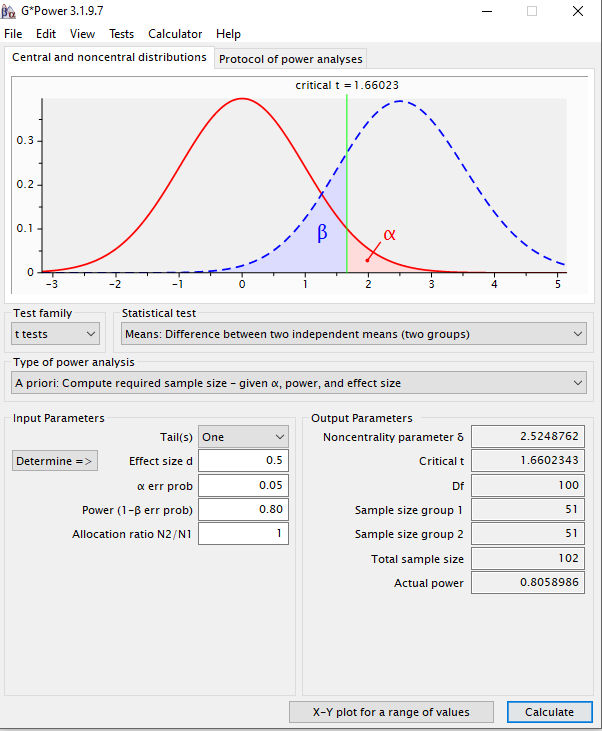
Let’s say you want to conduct a two-tailed independent samples t-test to compare the means of two groups. Here’s how to set it up in G*Power:
Select Test: Under “Test Family,” choose t-tests, and select Means: Difference between two independent means (two groups) under “Statistical Test.”
Set Parameters:
Effect Size (d): 0.50 (medium)
Alpha Level (α): 0.05
Power (1 – β): 0.80
Run Calculation: Click Calculate.
G*Power will show the required sample size per group to achieve 80% power at a 5% significance level. The following is an example of the output:
Conclusions
G*Power is a robust tool that simplifies the process of calculating sample sizes, ensuring your study has enough power to detect real effects without oversampling. By following this guide, you’ll be able to navigate G*Power efficiently, set up your power analysis, and understand your sample size requirements. Whether you are a seasoned researcher or new to study design, G*Power can provide the confidence and clarity needed to make informed decisions about your sample size.
 UNLOCK YOUR POTENTIAL
Leave a comment